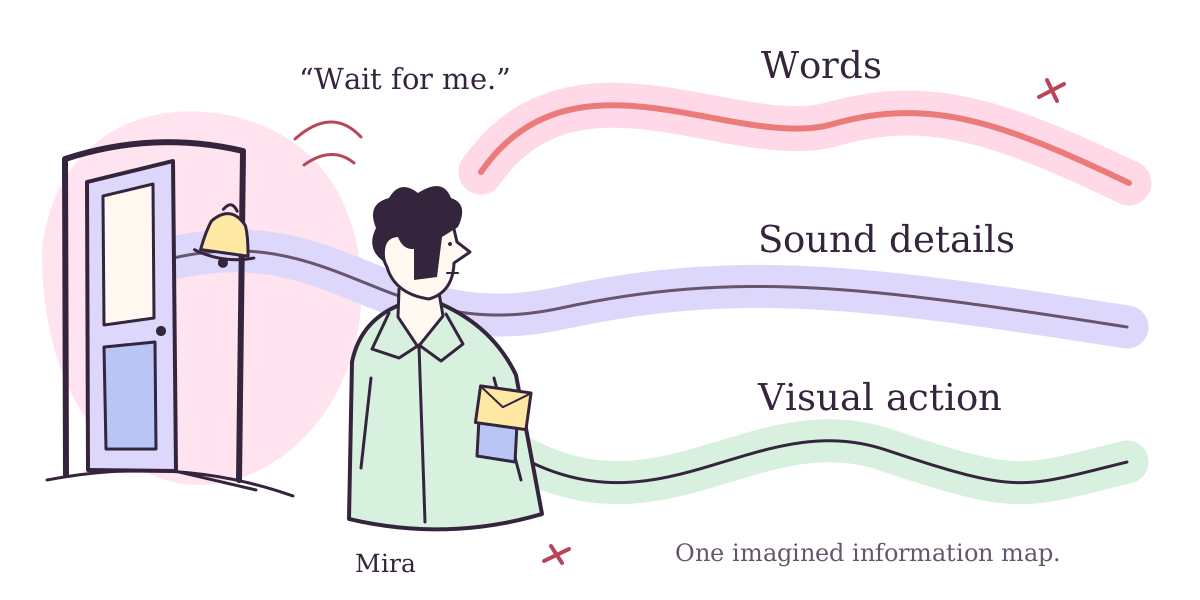
Subtitles and captions can carry audio information as text; audio description narrates visual information. CC and SDH are caption labels you may encounter. Start with the information you want, then check the tracks for your particular episode or version.
Two entries can share a language name while doing different jobs. Instead of treating one abbreviation as the best choice for everyone, ask what you want the track to carry. The small station scene below makes that question concrete without borrowing a film or asking you to identify something you cannot hear or see.
Three information jobs, with names that overlap
Netflix’s accessibility help describes subtitles as dialogue in text, and closed captions as adding descriptions of audible sounds. Its audio-description help describes optional narration of onscreen events, while warning that some shows lack it for particular seasons or episodes.
W3C WAI explains captions as synchronized text for speech and meaningful non-speech audio. Closed captions can be switched on or off; open captions remain displayed. Its terminology discussion cautions that subtitles and captions can mean overlapping things in different regions.
Apple’s guide expands SDH to subtitles for the deaf and hard of hearing, describing them as similar to CC with possible differences in language or availability. Keep the provider’s context.
Our comparison follows the information first. A label is a useful clue; it is not a complete description of every line a track contains. Keep a provider’s terminology attached to its context instead of treating these names as a universal ranking.
One entirely imagined station scene
Mira says, “Wait for me.” A station bell rings beyond a doorway. She silently slips a yellow envelope into a coat pocket. Those are all the stipulated events: we have invented the words, sound and action. Nothing establishes why she keeps the envelope or where she is going.
The illustration maps those different kinds of information; it is not a camera frame. Read each written snippet, then open its note. These untimed examples are not functioning captions or narration, and there is no hidden audio to identify.
Imagined dialogue-only snippet: “Wait for me.”
Does the sentence tell us about the bell or envelope?
It preserves the spoken request. It does not mention the bell, name its source or describe the pocket action. Compare the words actually printed with the complete scene above. We should not fill their silence with an assumption that every event has been carried into this snippet.
Imagined speech-and-sound snippet: “Mira: Wait for me. [Station bell rings beyond the doorway.]”
What information did the extra words add?
The speaker is identified and the stipulated sound has a place in the written account. That makes this a different information selection from the request alone. It still says nothing about the yellow envelope. More words here serve a particular purpose; they do not make the snippet a complete account of everything happening.
Imagined visual-description sentence: “Mira slips a yellow envelope into her coat pocket.”
Is this another way of writing what Mira said?
No. It conveys the visible action, rather than rewriting Mira’s request. WAI’s description guidance focuses on visual information. Our sentence describes the action without inventing a motive. It is printed here, not spoken.
Imagine three plain track labels: English; English [SDH]; English [Audio Description]. These are invented examples, not a service menu.
Should matching language names end the choice?
The repeated language does not settle which information job you want. Keep the label and exact episode or version together, then inspect the choices actually offered. This imagined list does not establish that all three exist for your title, that two providers share a menu or that changing a device creates a missing track.
Take the question to the title you actually want
Prime Video’s help limits features to titles that include them and notes device differences.
Keep the work, episode/version, language, desired information and offered track together in your own note. Leave an unconfirmed field open rather than importing a promise from another listing.
Continue through our Netflix hub or Prime Video hub for discovery and access context. Finding the work and choosing its information tracks are related decisions; give each the specific evidence it needs.